Evaluating the Brush Strokes Png Bundle for Professional Design Work
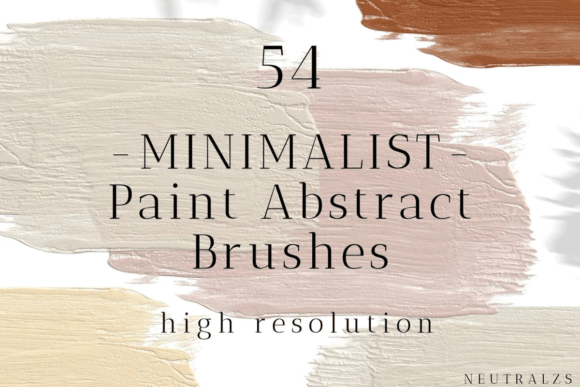
In the realm of digital design, the texture and weight of a visual element often determine the success of a composition. For designers seeking to inject organic movement into static layouts without committing hours to manual illustration, the Brush Strokes Png Bundle represents a significant resource. This specific collection offers a set of 54 abstract brush strokes, delivered as individual files in a transparent PNG format. With a resolution of 1200 DPI and dimensions reaching up to 4000px, the bundle is engineered to meet high-resolution print and large-format digital requirements. However, before integrating such assets into a workflow, it is essential to understand how this type of resource functions, where it excels, and what tradeoffs exist compared to other creative approaches.
Defining the Core Specifications and Utility
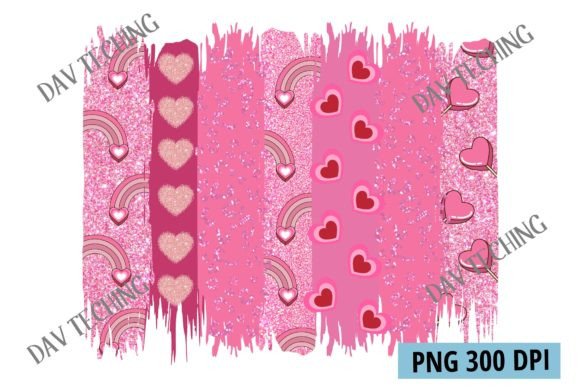
The primary distinction of the Brush Strokes Png Bundle lies in its technical specifications. Unlike standard raster images that may degrade when scaled, the 1200 DPI resolution ensures that each stroke retains crisp edges and detailed texture even when enlarged significantly. The 4000px width provides ample canvas for expansive designs, while the transparent background allows for seamless layering over photographs, solid colors, or complex gradients. The inclusion of 54 unique files means the library covers a spectrum of pressures, angles, and paint consistencies, from thin, dry-brush lines to thick, wet splashes.
For professionals aged 20 to 50 who manage diverse client projects, the efficiency gained from pre-rendered assets is often more valuable than the time spent creating them from scratch. The bundle serves as a toolkit for rapid prototyping and final execution alike. Whether designing a book cover, a website header, or a marketing poster, these elements can instantly add depth and an "hand-crafted" feel that vector shapes sometimes lack. The PNG format, while not editable like a vector, offers immediate compatibility with almost all industry-standard software, including Adobe Photoshop, Illustrator, InDesign, and web-based editors.
Comparing Raster Assets Against Vector Alternatives
When evaluating design resources, the choice between raster bundles like the Brush Strokes Png Bundle and vector-based alternatives is a common decision point. Vector brushes, typically found in AI or SVG formats, offer infinite scalability and editable paths. They are ideal for logos or icons where mathematical precision is required. However, vectors often struggle to replicate the chaotic, imperfect nature of real paint. A vector path is inherently smooth; a real brush stroke has dried pigment, uneven edges, and color variation.
This is where the PNG format shines. Because these 54 strokes are high-resolution photographs or digital paintings saved as rasters, they capture the micro-textures of actual media. If a project demands a gritty, authentic aesthetic—such as an album cover for an indie band or a packaging design for artisanal goods—the Brush Strokes Png Bundle provides a level of realism that vector tools cannot easily simulate without extensive manual texturing. The tradeoff is flexibility: once placed, you cannot reshape the stroke's path, only transform its size, rotation, or opacity.
Assessing Workflow Integration and Efficiency
The practical value of any asset library depends heavily on how well it integrates into an existing workflow. The Brush Strokes Png Bundle is designed for speed. In a traditional painting process, a designer might spend 20 minutes loading a tablet, calibrizing pressure sensitivity, and painting a single accent line. With this bundle, that same effect is achieved in seconds by dragging and dropping a file. This efficiency is particularly beneficial for agencies handling tight deadlines or freelancers juggling multiple clients.
However, reliance on pre-made assets requires a strategic approach to avoid generic results. Using the exact same 54 strokes across every project can lead to a repetitive visual style. To mitigate this, experienced designers treat these PNGs as raw materials rather than finished products. Techniques such as blending modes (e.g., Multiply, Screen, Overlay), hue/saturation adjustments, and layer masks allow the user to modify the appearance of the strokes. By altering the color palette to match a brand guide or masking out portions of a stroke, the assets become unique to the specific project context.
Best-Fit Scenarios for High-Resolution PNGs
Not every design project benefits equally from this type of resource. The Brush Strokes Png Bundle is most effective in situations where texture and atmosphere are paramount. For instance, in editorial design, these strokes can break up blocks of text or frame headlines with an artistic flair. In web design, they serve as excellent background elements that soften the rigid geometry of grid-based layouts. The high DPI also makes them suitable for large-scale applications, such as billboard graphics or event backdrops, where lower-resolution assets would appear pixelated upon close inspection.
Conversely, if a project requires strict adherence to corporate identity guidelines that demand geometric precision, or if the final output is a small icon for a mobile app interface, these large, textured strokes may be overkill or inappropriate. Similarly, for animations requiring fluid motion, static PNGs are less versatile than procedural animation tools or video footage. Understanding these limitations ensures that the bundle is deployed where it adds genuine value rather than serving as a decorative afterthought.
Navigating Tradeoffs and Decision Factors
When deciding whether to invest time in exploring the Brush Strokes Png Bundle versus other methods, several factors come into play. Cost is one consideration; while many bundles are affordable, the cost must be weighed against the value of the time saved. If a designer creates custom brushes frequently, the marginal benefit of purchasing a bundle decreases. However, for those who need a wide variety of styles quickly, the breadth of the 54-file collection offers a high return on investment.
Another critical factor is file management. Managing 54 separate high-resolution PNG files requires an organized folder structure. Without proper organization, searching for the perfect stroke can become tedious. Some users prefer libraries that come with integrated plugin support or searchable databases, whereas this bundle relies on standard file navigation. This is a minor logistical hurdle but one worth noting for teams with strict asset management protocols.
Licensing is also a vital component of the evaluation process. Most commercial PNG bundles offer broad usage rights for personal and commercial projects, but it is always prudent to review the specific license agreement included with the download. Ensuring that the intended use—whether for a client campaign, a product for sale, or internal branding—is covered prevents legal complications down the line. Unlike some stock photo sites that charge per download or require subscriptions, a bundle purchase typically grants perpetual access to the files, making it a one-time acquisition.
Strategic Implementation for Maximum Impact
To get the most out of the Brush Strokes Png Bundle, designers should focus on integration rather than isolation. These strokes work best when combined with other design elements. Pairing a bold, dark stroke with a vibrant gradient background can create a striking contrast that draws the eye. Layering multiple strokes with varying opacities can build complex textures that mimic watercolor washes or oil paint impasto.
Furthermore, the abstract nature of the strokes allows for versatility across different industries. A tech startup might use a clean, sharp stroke to convey innovation, while a wellness brand could utilize softer, diffused strokes to suggest calmness. The key is to select the specific files from the 54 available that align with the emotional tone of the brand. This selective approach transforms a generic asset pack into a curated design language.
Conclusion on Resource Selection
The Brush Strokes Png Bundle occupies a specific niche in the digital design ecosystem. It bridges the gap between the authenticity of hand-painted art and the efficiency of digital production. While it does not replace the need for original illustration or the precision of vector graphics, it offers a robust solution for adding texture, movement, and character to a wide array of projects. For designers looking to enhance their workflow without compromising on quality, the high resolution and variety provided by this 54-file collection make it a compelling option. Ultimately, the decision to use such a bundle depends on the specific needs of the project, the desired aesthetic, and the balance between speed and customization that the designer seeks to achieve.