Grunge Gold Brush Stroke Collection Guide
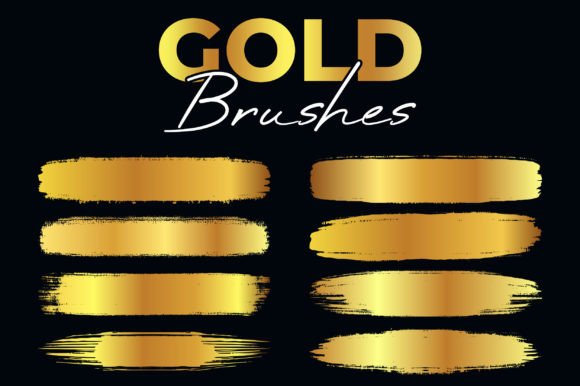
Elevating a design often comes down to the texture and depth you can add to your artwork. The Grunge Gold Brush Stroke Collection offers exactly that: a way to inject luxury, grit, and character into digital projects without spending hours creating textures from scratch. Whether you are designing a wedding invitation, a brand logo, or a social media graphic, these brushes provide an instant aesthetic upgrade. They combine the rough, organic feel of grunge art with the shimmering appeal of gold, creating a visual style that feels both vintage and premium.
Why Texture Matters in Modern Design
In a world filled with flat, vector-perfect graphics, adding a touch of imperfection can make your work stand out. The Grunge Gold Brush Stroke Collection is built on this principle. It captures the look of worn metal, distressed paint, and hand-painted strokes. This isn't just about making things look old; it's about adding a sense of history and craftsmanship to your digital files. When you apply these strokes, you break up the sterility of standard computer-generated lines, giving your audience something more tactile to look at.
For beginners and casual users, this collection removes the technical barrier to high-end texturing. You don't need to be a master of photo manipulation to achieve a professional result. For professionals and freelancers, it saves valuable time. Instead of searching for stock photos, masking them, and adjusting levels, you can simply select a brush and draw. The versatility of these tools means they fit seamlessly into various workflows, from quick concept sketches to final print-ready assets.
Customization and Flexibility
One of the most powerful aspects of this resource is its adaptability. A common concern with pre-made assets is that they might not fit your specific color palette or layout. With this collection, that worry is unnecessary. You can easily change colors and dimensions on software that can open and edit the EPS files. This flexibility allows you to transform the default gold tones into silver, bronze, copper, or any custom hex code required by your brand guidelines.
The ability to scale these brushes without losing quality is crucial for professional work. Because the core files are vector-based (AI and EPS), you can resize a stroke to be as small as a delicate underline or as large as a banner across a billboard. If you need a specific dimension for a web header or a mobile app icon, the editable nature of the files ensures crisp edges every time. This level of control makes the Grunge Gold Brush Stroke Collection a practical investment for anyone who needs consistent branding across different mediums.
What Is Included in the Package
To ensure you have the right tool for every job, the package comes with a comprehensive set of file formats. Each format serves a specific purpose in the creative workflow, ensuring compatibility with almost any design software you might use. Here is exactly what you will get:
- 1 File AI Illustrator CC: Perfect for Adobe users who need full vector editing capabilities within their primary workspace.
- 1 File EPS 10: A universal vector format compatible with older versions of Illustrator, CorelDRAW, and other vector editors.
- 8 Files SVG: Ideal for web designers and developers who need scalable graphics for responsive websites and applications.
- 8 PNG Gold Brushes: High-resolution raster images with a width of 6000 pixels and a transparent background, ready for immediate use in Photoshop or Canva.
- 8 PNG Black Brushes: Matching black versions, also 6000 pixels wide with transparent backgrounds, offering a stark contrast option.
- Resolution 300 DPI: Ensures that all raster elements are sharp enough for high-quality printing.
This variety means you aren't locked into one program. If you prefer working in Inkscape, the SVG files are perfect. If you are doing quick edits in PowerPoint or Google Slides, the PNGs are ready to drop in. The inclusion of both gold and black options gives you the freedom to experiment with light and dark themes instantly.
Practical Applications for Creators
The uses for the Grunge Gold Brush Stroke Collection extend far beyond simple decoration. Entrepreneurs and small business owners can use these strokes to create unique packaging labels that suggest a boutique, artisanal quality. Imagine a coffee bag label where the brand name is written in a distressed gold script over a textured background; it immediately signals "premium" to the customer.
Marketers and bloggers can leverage these assets for eye-catching social media headers or YouTube thumbnails. In a crowded feed, a clean white text often gets lost, but a bold, grungy gold stroke grabs attention. Educators and content creators can use the black PNG brushes to add dynamic underlines or bullet points to presentation slides, making educational materials feel less rigid and more engaging.
Freelancers offering services like logo design or album cover art can incorporate these brushes to give clients a distinct look. For example, a music band looking for a rock-and-roll vibe can use the grunge texture to convey energy, while a jewelry brand can use the gold variant to emphasize elegance. The key is understanding that these brushes are not just decorations; they are functional design elements that communicate a mood.
Choosing the Right Format for Your Project
Before diving in, consider your end goal. If your project involves print—such as business cards, flyers, or posters—you should prioritize the vector files (AI, EPS) or the high-resolution 300 DPI PNGs. Vector files allow for infinite scaling, which is essential if your printer requires larger dimensions than the original design. Using a low-resolution image for print can result in pixelation, ruining the professional look you are trying to achieve.
For digital-only projects like websites, email newsletters, or social media posts, the SVG and PNG files are often more efficient. SVGs load quickly and remain sharp on any screen size, from a smartphone to a 4K monitor. The PNG files with transparent backgrounds are particularly useful when you need to overlay the brush stroke onto a colored background or a photograph without a white box appearing around it.
It is also worth noting that while the default colors are striking, you should always test how the gold interacts with your background colors. Gold can sometimes appear muddy against certain warm tones, so using the editable EPS files to tweak the hue slightly can make a significant difference in the final output.
Getting Started with Your New Brushes
Integrating the Grunge Gold Brush Stroke Collection into your workflow is straightforward. Start by importing the AI or EPS file into your preferred vector software. From there, you can define new brush presets or simply copy and paste the shapes as needed. For raster programs like Photoshop, import the PNG files as layers. Use layer blending modes like "Overlay" or "Soft Light" to integrate the texture naturally with your underlying design.
Remember that less is often more. While these brushes are powerful, overusing them can clutter a design. Use them to highlight key information, frame important sections, or add a signature touch to your logo. By balancing the heavy texture with clean whitespace, you create a composition that is both stylish and readable.
Whether you are a hobbyist exploring new design techniques or a seasoned professional looking to streamline your process, this collection provides the tools you need to create compelling visuals. The combination of high resolution, multiple formats, and full editability ensures that you have the flexibility to bring your creative vision to life, no matter the scope of the project.